Automation Guide
The pillar blog established that your daily check exists for one purpose: catching anomalies.
Not scaling decisions. Not performance reviews. Anomalies, things that are broken, spiking, or falling in a way that requires immediate action.
But “check for anomalies every morning” only works if you know exactly what constitutes an anomaly, have a system that surfaces them before they compound, and don’t spend 45 minutes pulling data to find what took 2 minutes to fix.
This is the build guide for a D2C anomaly alert system that catches fires automatically, so your daily check really does take 5 minutes.
The first mistake brands make with anomaly detection: treating every variance from yesterday as an anomaly.
Ad performance fluctuates daily. Conversion rates move with day-of-week patterns. Revenue on Monday looks different from Friday. None of this requires action.
A deviation above a defined threshold from a meaningful baseline that, if unaddressed, causes measurable damage.
The operative words:
Everything else is noise. Your alert system should only surface genuine fires.
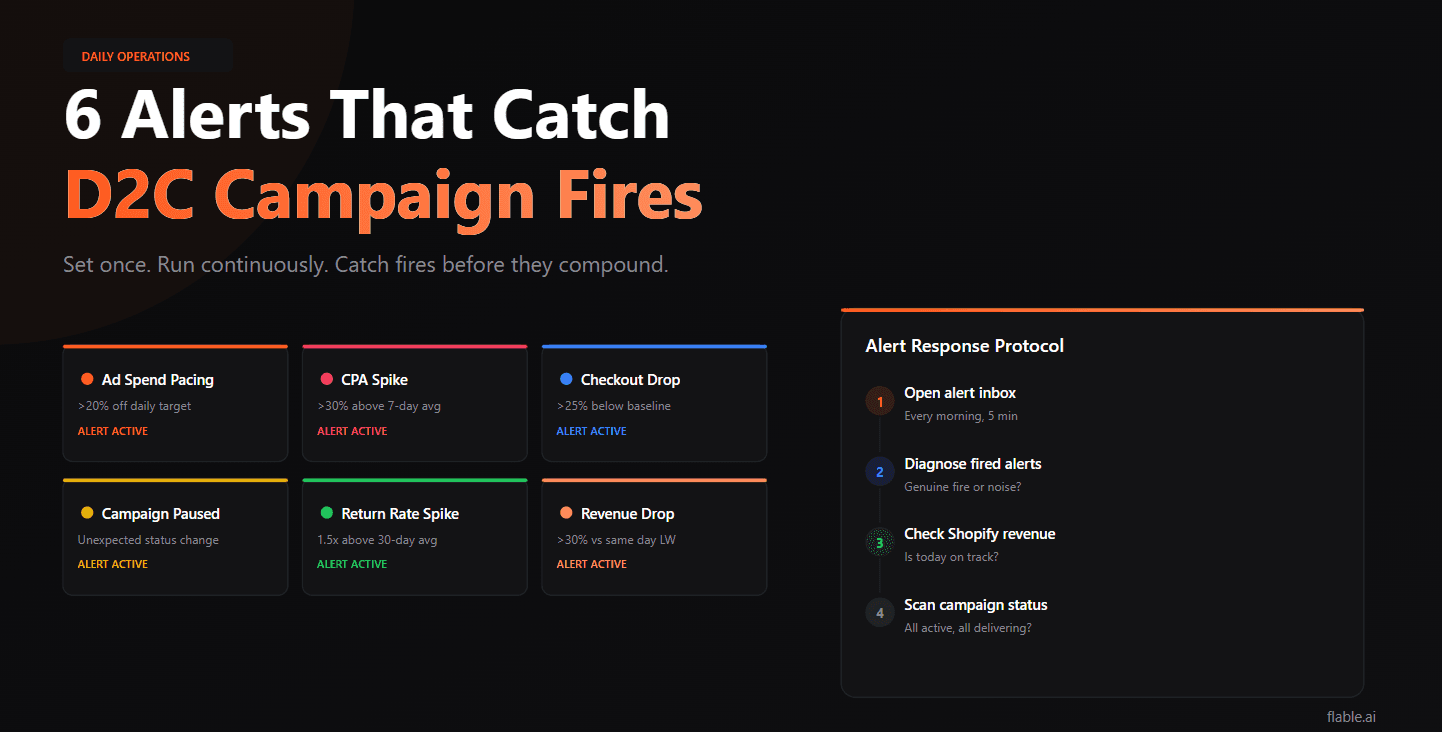
Build these six
Anomaly 1
What it is: Your campaign is spending significantly more or less than your daily budget target by the midpoint of the day.
Why it matters: Overpacing means you’ll exhaust the budget before the highest-conversion window (typically evening in India). Underpacing means the campaign is failing to deliver, audience too narrow, bid too restrictive, or ad disapproval.
Meta: Ads Manager → Automated Rules → Create Rule → “When daily spend is less than X% of daily budget” or “greater than Y%.” Set notification to email + in-app.
Google: Google Ads → Rules → Budget pacing rule per campaign.
Anomaly 2
What it is: Cost per purchase has jumped significantly above its recent baseline.
Why it matters: A sudden CPA spike usually means one of four things: creative entered fatigue, audience has saturated, a competing brand entered your auction, or your landing page has a technical issue. All four require different fixes but all require immediate attention.
Meta: Ads Manager → Automated Rules → “When cost per result is greater than ₹X”, set ₹X to 130% of your 7-day average CPA. Applies to each campaign separately.
Google: Google Ads → Rules → “When Cost/conv. is greater than X.”
Anomaly 3
What it is: The percentage of sessions that complete checkout has dropped significantly, often indicating a technical problem with your Shopify store, payment gateway, or landing page.
Why it matters: This is the highest-urgency anomaly. Ad spend continues flowing. Customers are arriving. Nothing is converting. Every hour of a broken checkout is revenue gone.
How to monitor: Shopify Analytics → Conversion Summary → set up a daily check or use a third-party monitoring tool (Littledata, Triple Whale) with checkout conversion alerts.
Anomaly 4
What it is: A campaign that should be running has paused (ad disapproval, payment issue, budget exhaustion) or has reset into Learning Phase due to an unintended change.
Why it matters: Paused campaigns stop spending. Learning Phase resets mean you’re back to suboptimal optimisation for 7+ days. Both cause revenue disruption that compounds with time.
Meta: Ads Manager → Automated Rules → “When campaign status changes to paused”, notification only (don’t auto-restart, always investigate first).
Anomaly 5
What it is: Returns coming through your logistics portal have spiked significantly above your normal rate within a campaign’s attribution window.
Why it matters: A sudden return rate spike, often tied to a specific batch, a creative that set the wrong expectation, or a product quality issue, is destroying CM2 silently. Platform ROAS won’t catch it. Only your returns data will.
How to monitor: Pull from your logistics platform (Shiprocket, Delhivery, Pickrr) or Shopify returns data weekly. Most logistics platforms have email summary reports you can schedule.
Anomaly 6
What it is: Today’s revenue is tracking significantly below what the same day of the week generated last week.
Why it matters: A large revenue drop could indicate a technical issue (payment gateway down, checkout error), a campaign going down, or a significant market shift. Catching it by 2pm allows same-day diagnosis and resolution.
How to monitor: Shopify has native revenue alerts in the mobile app. Alternatively, use Shopify Flow (automation tool) to send email notifications when daily revenue drops below a threshold.
You don’t need expensive software. The native tools inside Meta, Google, and Shopify cover most of these alerts.
Free
Ads Manager → Automations → Create Rule. Available for free to all advertisers. Set up rules per campaign or at the account level. Notifications via email and in-app.
Free
Campaigns → Rules → Create Rule. Same capability as Meta, trigger on performance thresholds, notify or take action automatically.
Included
Shopify mobile app → enable order notifications. Shopify Flow (included in Shopify plans) enables conditional triggers, “if daily revenue is below X, send email to [address].”
Optional
For checkout conversion rate anomalies specifically, tools like Littledata or Elevar provide real-time tracking with alert capabilities that Shopify’s native analytics can’t match.
Shiprocket, Delhivery, and most major Indian logistics partners send daily/weekly delivery and return summary emails. Configure these to land in a monitored inbox and review the return rate section each morning.
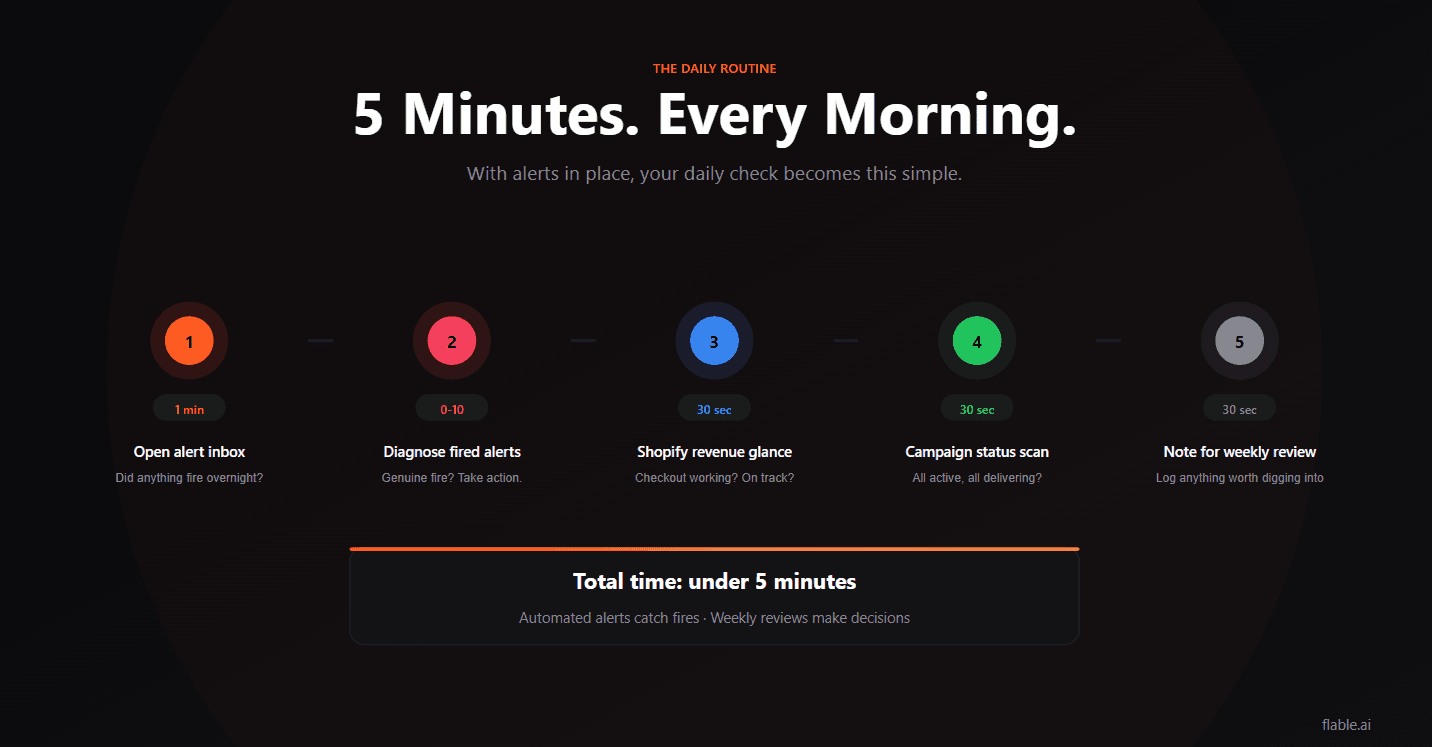
With the alert system running, your daily check becomes:
Open your alert inbox (1 minute)
Did any alerts fire overnight or this morning? If no alerts, skip directly to step 3.
Diagnose any alerts that fired (0–10 minutes)
What triggered it? Is it a genuine fire or a false positive? What action is needed?
30-second Shopify revenue glance
Is today tracking within normal range? Is the checkout working?
30-second campaign status scan
All campaigns active and delivering? Any unexpected pauses?
Note anything to address in the weekly review (30 seconds)
Not a CPA that’s slightly high, an actual data point that warrants deeper investigation.
Total: 3–5 minutes if no alerts fired. 10–15 minutes if something needs addressing.
The rest of performance management, scaling, killing, creative decisions, belongs in the weekly review, not the daily check.
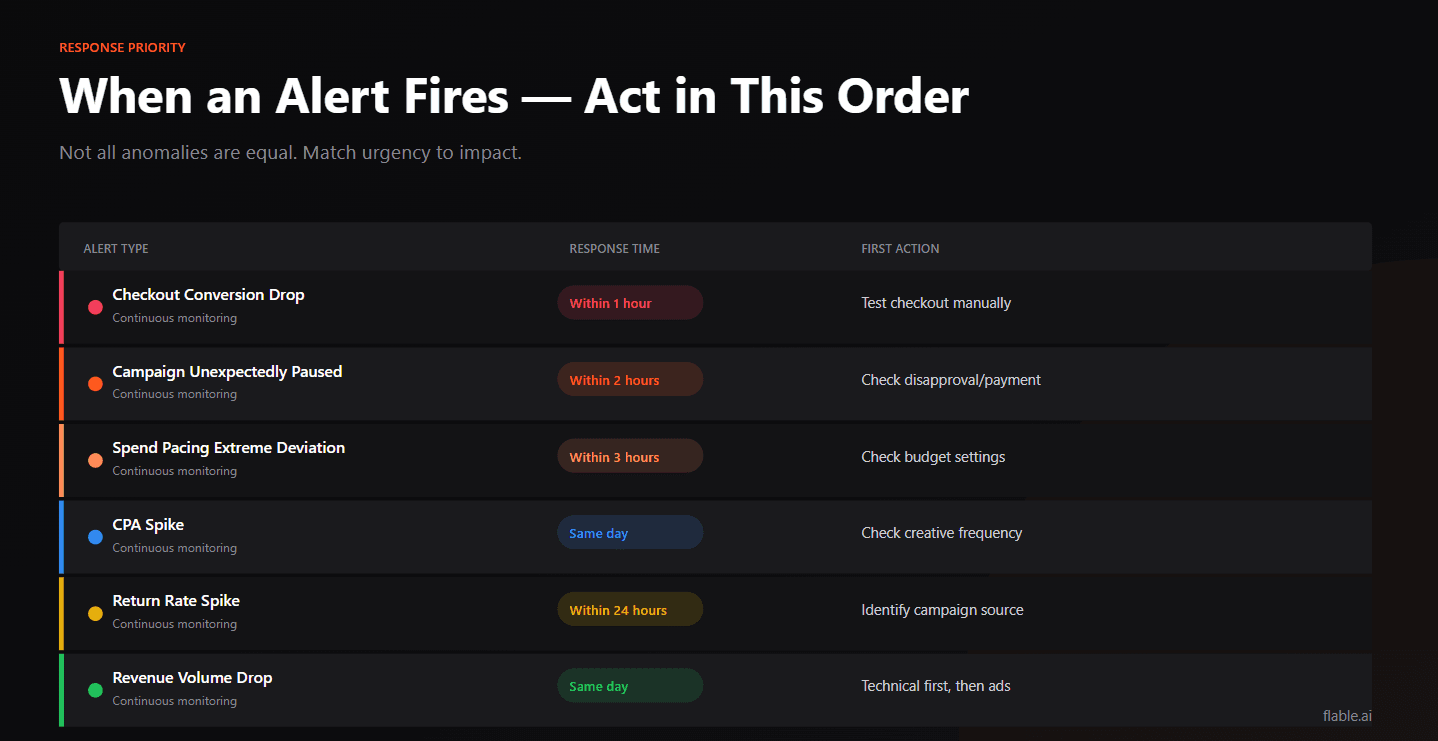
Not every alert requires the same response speed.
| Alert type | Response time | First action |
|---|---|---|
| Checkout conversion drop | Within 1 hour | Check Shopify status, test checkout manually |
| Campaign unexpectedly paused | Within 2 hours | Check disapproval reason or payment issue |
| Spend pacing extreme deviation | Within 3 hours | Check budget settings and delivery |
| CPA spike | Same day | Check creative frequency, audience reach |
| Return rate spike | Within 24 hours | Identify which campaigns/products are affected |
| Revenue volume drop | Same day | Check for technical issues first, then campaigns |
The sequence is always: Is it a technical issue? → Is it a campaign issue? → Is it a market/seasonal issue?
Technical issues require same-day resolution. Campaign issues can be addressed within the day. Market/seasonal issues require no immediate action, document for the weekly review.
The daily check in the D2C KPI dashboard framework exists for one purpose, catching fires before they compound.
An automated alert system makes this possible without manual data-pulling. Build the six alerts. Check the inbox every morning. Spend 5 minutes, not 45.
The decisions that matter, scaling, killing, restructuring, stay in the weekly review where they belong.
Automated alerts catch fires. Weekly reviews make decisions. Keep the two separate.
Checkout conversion rate drop, because it's the fastest-moving, highest-impact anomaly. Ad spend continues flowing while revenue stops. Every hour unaddressed is money spent with no return. Set this alert up first via Shopify Flow or a third-party tool.
Both. You can set rules to notify only (recommended for most alerts, always investigate before acting) or to take action automatically (e.g., pause a campaign when CPA exceeds a threshold). For most D2C brands, notification-only rules are safer, automated actions can cause unintended consequences during Learning Phase.
A deviation above a defined threshold from a meaningful baseline (the 7-day average or same-day-last-week, not just yesterday) that, if unaddressed, causes measurable damage: wasted budget, a broken checkout, or campaigns in an unintended state.
Flable provides real-time CM2 and POAS per campaign, so anomalies in profitability (not just delivery metrics) surface immediately. When a campaign's POAS drops below 1.0 intraday, Flable flags it, giving you the profitability signal that Meta's native automated rules cannot provide.
Flable AI flags a campaign the moment its POAS drops below 1.0 intraday, the profitability signal native ad platform rules can’t give you.