Deep Dive
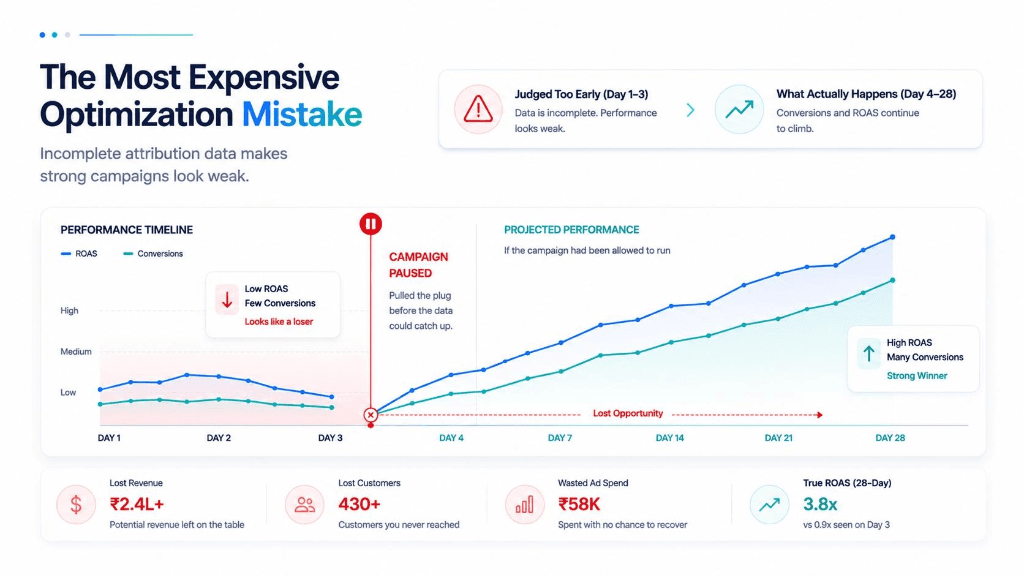
If your Shopify revenue and Meta revenue don't match — and they almost certainly don't — Conversions API is one of the most important fixes available to you.
15% – 40%
Recovered lost conversions
20 Mins
Zero code required
Event ID
Automatic Pixel + CAPI match
Not because it closes the gap entirely. But because a significant part of the gap is caused by Meta missing conversions it should be seeing, and CAPI is what gives those conversions back.
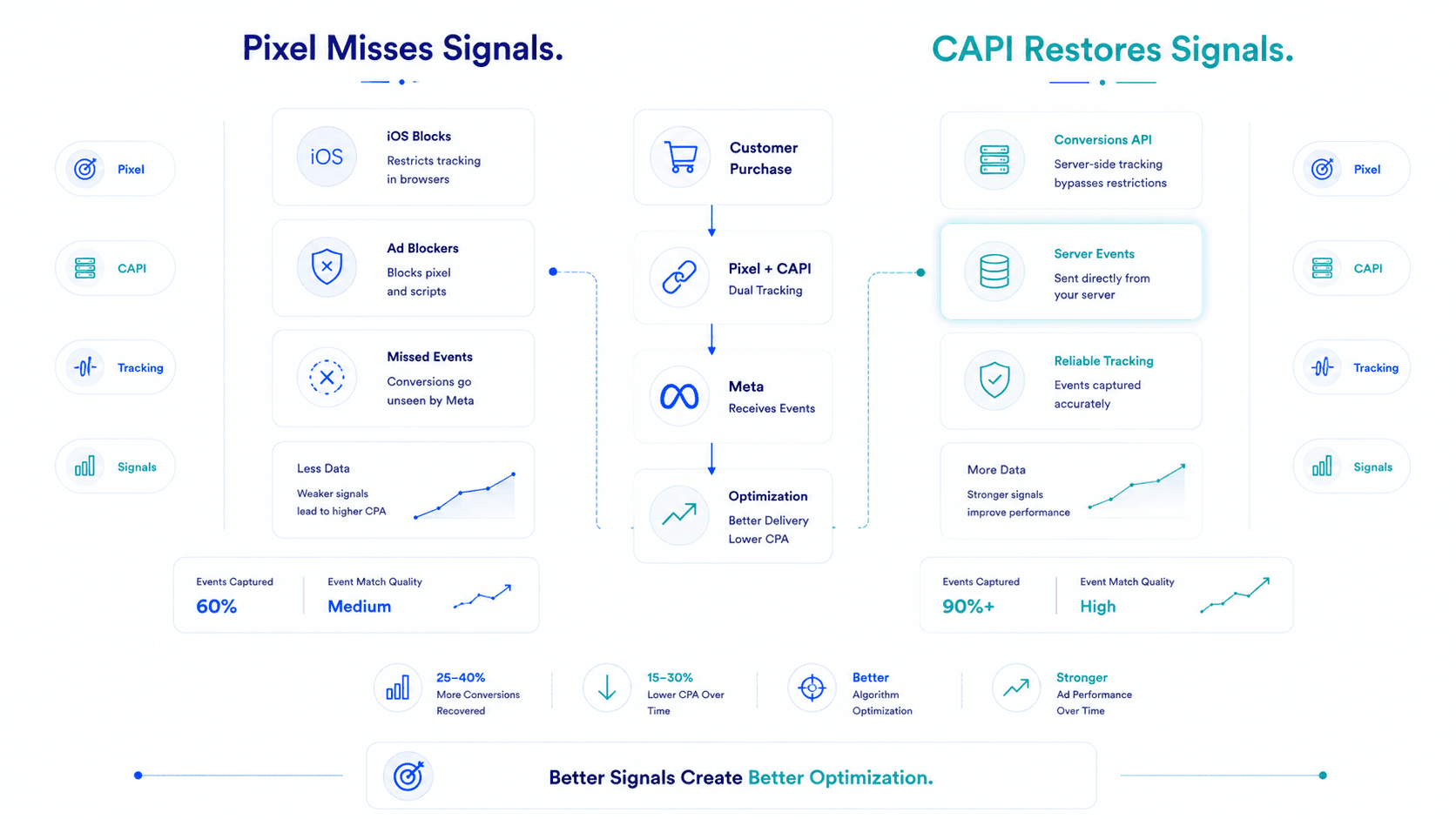
When Meta's pixel misses a purchase because of iOS privacy settings, an ad blocker, or a browser restriction — the algorithm doesn't see that conversion. It doesn't know the campaign worked. It optimises away from the audience that just bought from you. Your ROAS looks lower than it should. Your CPAs creep up. And the platform starts finding worse and worse conversions because the signal telling it what "good" looks like has holes in it.
CAPI fixes this at the source. Here's exactly how to set it up.
Conversions API is Meta's server-side tracking solution. Instead of relying entirely on a browser-based pixel (which can be blocked by iOS, Safari, Firefox, or ad blockers), CAPI sends conversion events directly from your server to Meta.
The customer buys. Your server records the purchase. Your server sends the event to Meta. No browser involved. No iOS privacy gate. No ad blocker interference.
CAPI doesn't replace your pixel — it runs alongside it. Together, pixel + CAPI gives Meta the most complete possible view of your conversions. Meta calls this redundant tracking "event deduplication" — when both the pixel and CAPI fire for the same purchase, Meta reconciles them and counts it once.
The result: More conversions visible to Meta, better algorithm optimisation, lower effective CPA over time, and a smaller (though not zero) gap between your Shopify and Meta revenue numbers.
The conversion recovery from CAPI varies by audience and category. General benchmarks:
For a brand running ₹5L/month on Meta with 30% iOS audience share, CAPI typically recovers 200–400 additional attributed conversions per month that the pixel alone was missing. That's not a marginal improvement — it's the difference between Meta seeing your campaign as a moderate performer and seeing it as a strong one.
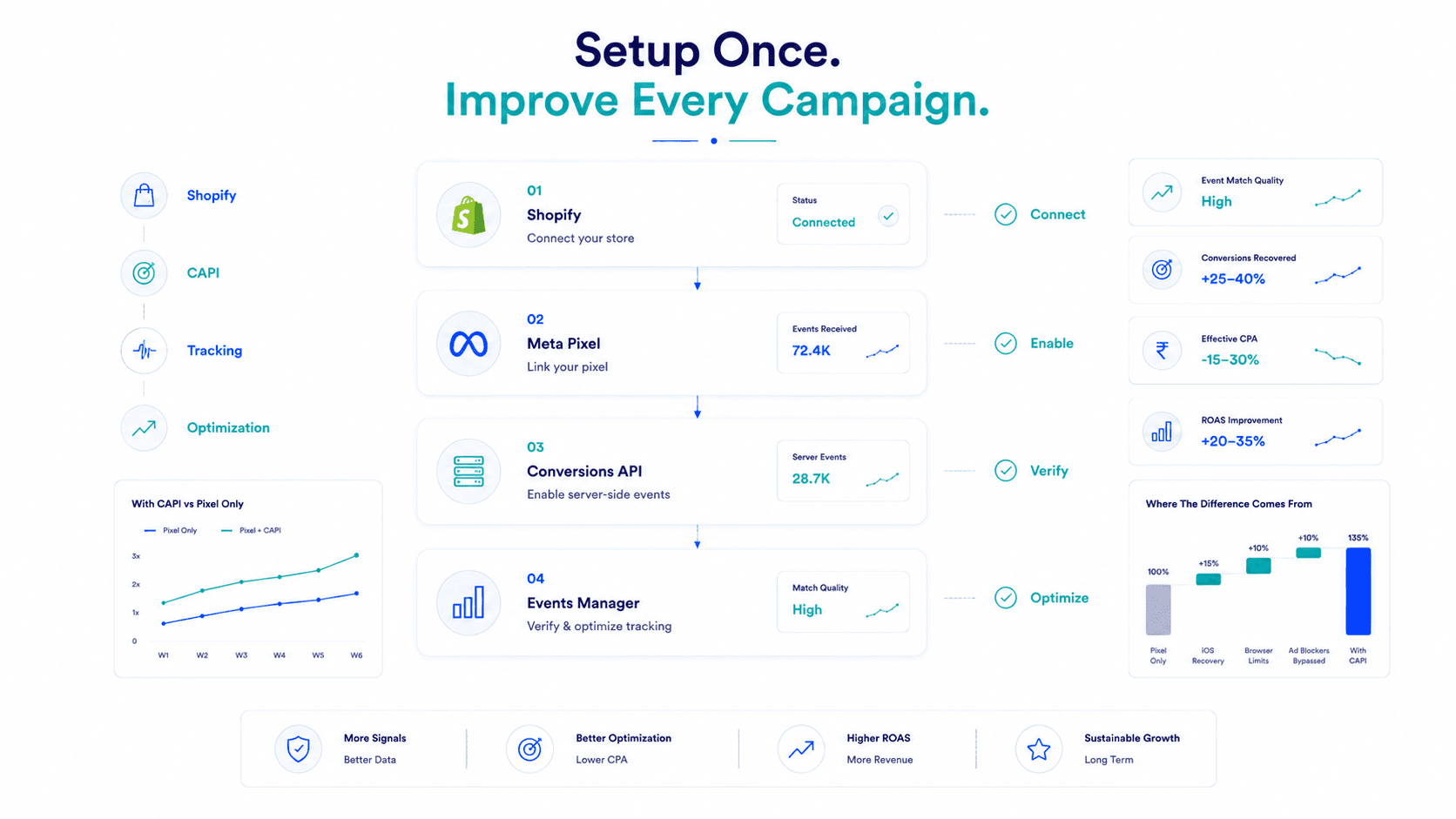
Meta's native Shopify integration is the fastest and most reliable CAPI setup for most D2C brands. It takes approximately 20 minutes and requires no developer.
If you haven't already:
Within the Facebook & Instagram channel in Shopify:
That's it for the basic CAPI setup. Shopify's native integration handles the server-side event sending automatically from this point.
Within 24–48 hours of enabling:
You should now see events attributed to two sources:
The Purchase event should show both sources. This confirms CAPI is firing correctly.
💡 Healthy event breakdown: For a typical D2C brand post-CAPI setup, browser events contribute 60–70% of conversions and server events contribute 30–40%. If server events are below 10%, CAPI may not be configured correctly — go back to Step 2 and confirm Maximum data sharing is selected.
If you're on a custom Shopify theme, using a third-party checkout, or need more control over what data is sent, manual CAPI setup via the Meta Conversions API Gateway or a direct API integration is an option.
Meta offers a self-hosted gateway that handles CAPI without requiring custom API calls. Setup involves:
This is more technical than the native Shopify integration but gives you full control over what data is shared and how.
Several tools handle CAPI setup for Shopify without requiring developer work:
These tools typically cost ₹3,000–15,000/month depending on order volume. For brands spending ₹5L+/month on Meta, the conversion recovery from CAPI almost always justifies this cost within the first month.
When both your pixel (browser) and CAPI (server) fire for the same purchase, Meta needs to know they're the same event — otherwise it double-counts the conversion.
Deduplication is handled through Event ID, a unique identifier you assign to each event that Meta uses to match the pixel event against the CAPI event.
Shopify's native integration handles this automatically. Shopify assigns Event IDs and passes them through both the pixel and CAPI simultaneously. You don't need to do anything additional.
For manual CAPI setups: You must pass a matching event_id parameter in both your pixel event and your CAPI call. The IDs must match exactly for the same purchase event. If they don't match, Meta counts both and your reported conversions increase without any actual increase in real purchases.
How to check deduplication is working:
CAPI is powerful. It's not a complete solution to the Shopify-Meta gap.
CAPI does not fix attribution overlap. Meta claiming credit for sales that Google also claims is a platform-level attribution issue, not a tracking gap. CAPI sends more accurate conversion data to Meta, but both Meta and Google still attribute the same customer independently.
CAPI does not fix view-through over-attribution. Meta's algorithm will still use view-through attribution for conversions it receives via CAPI. You're now sending more accurate purchase data, but the attribution model that decides which conversions get credited to which campaigns remains unchanged.
CAPI does not reflect returns. Purchase events sent via CAPI are permanent in Meta's reporting. When a customer returns a product, the CAPI purchase event is not reversed. The Shopify-Meta gap from returns remains.
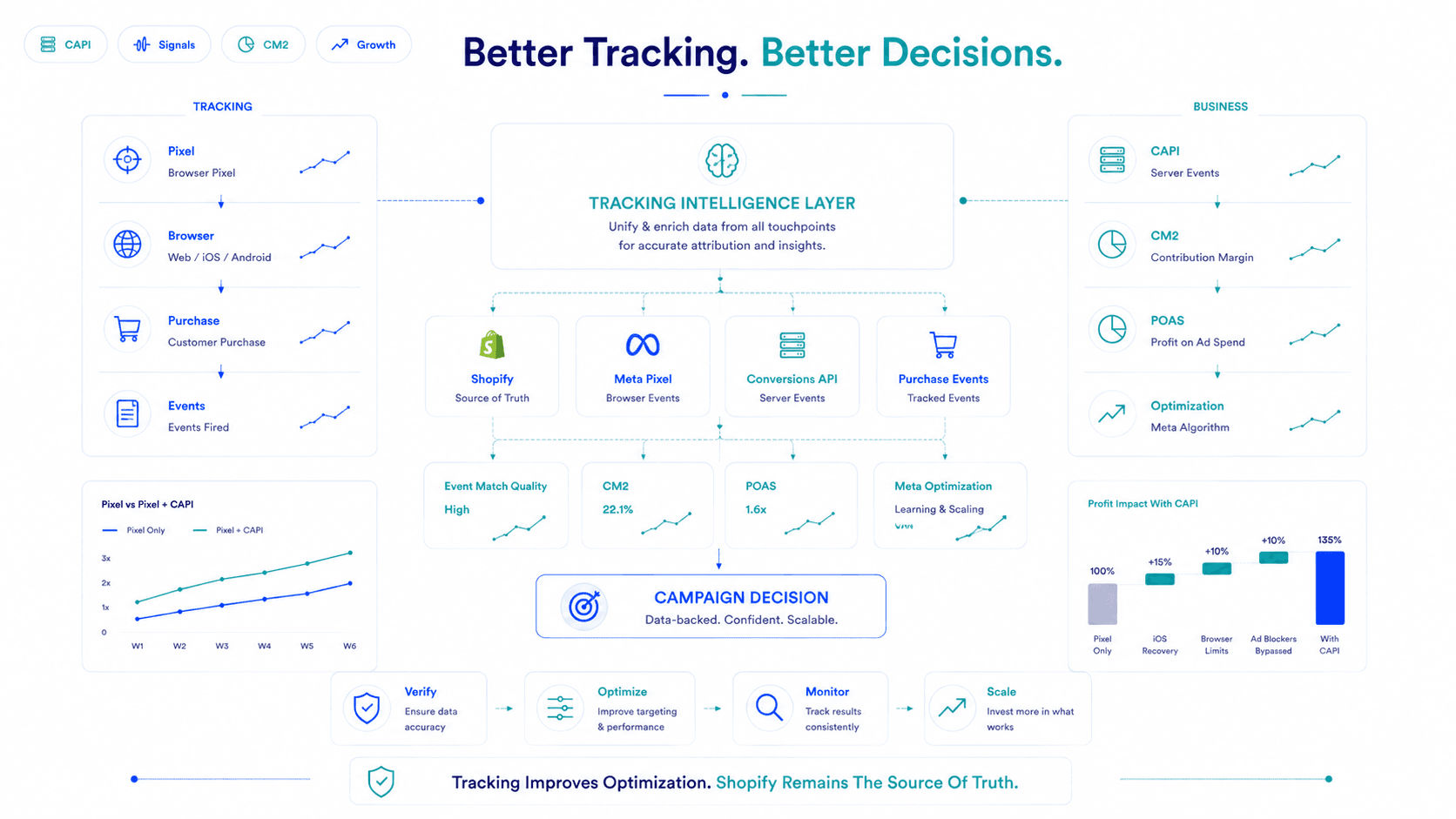
The fix for these remaining gaps: MER (Marketing Efficiency Ratio) as your cross-channel benchmark, and return-adjusted POAS/CM2 as your campaign profitability metric — both calculated from Shopify net revenue, not Meta's attributed figures. CAPI improves Meta's optimisation quality; MER and POAS tell you the real business outcome.
Week 1–2
Conversion volume in Meta Ads Manager increases as server-side events recover previously invisible purchases. ROAS may appear to improve — this is partly real (better optimisation signal) and partly reporting (Meta now sees more conversions).
Week 2–4
Algorithm optimisation improves as Meta has a more complete conversion signal. CPAs typically improve by 10–25% for brands with significant iOS audience share.
Week 4+
Ongoing improvement as the algorithm's audience model becomes more accurate. The most significant long-term impact is usually on Lookalike audience quality — better conversion signal data = better lookalikes = better prospecting performance.
The Shopify-Meta gap
Will narrow from the iOS tracking portion but will not close entirely. Attribution overlap (cross-channel double-counting) and return rate discrepancies remain. Continue tracking MER weekly as your ground truth for overall marketing efficiency.
Conversions API is the most impactful technical fix available for D2C brands experiencing a large Shopify-Meta revenue gap caused by tracking loss.
Set it up via Shopify's native integration in 20 minutes. Verify in Events Manager within 48 hours. Monitor the conversion recovery over 2–4 weeks. And remember that CAPI improves Meta's ability to optimise — but Shopify net revenue remains your ground truth for actual business performance.
Better tracking makes Meta smarter. It doesn't make Meta's reporting the truth. Keep measuring both.
Key Takeaways
Frequently Asked Questions
CAPI is Meta's server-side tracking solution that sends conversion events directly from your server to Meta, bypassing iOS privacy restrictions and browser-based pixel limitations. D2C brands need it because without it, Meta is missing 20–40% of actual conversions causing the algorithm to underperform and making ROAS appear lower than it actually is.
Via Shopify's native Facebook & Instagram channel: go to Settings → Apps → Facebook & Instagram → Data Sharing Settings → select Maximum. This enables CAPI automatically. Verify in Meta Events Manager within 48 hours by checking that Purchase events show both browser and server sources.
Partially. CAPI recovers conversions Meta was missing due to iOS restrictions and browser blocking narrowing the gap by 15–40% depending on your audience. It does not fix attribution overlap (Meta and Google double-counting the same sales) or return rate discrepancies (Meta doesn't reverse purchase events when returns happen).
When both the pixel (browser) and CAPI (server) fire for the same purchase, Meta uses a unique Event ID to recognise they're the same event and count it once. Shopify's native CAPI integration handles deduplication automatically. Manual CAPI setups require explicitly matching Event IDs in both the pixel call and the CAPI call.
Flable uses your Shopify purchase data (not Meta's attributed figures) as the ground truth for revenue so CM2 and POAS calculations reflect what actually happened in your business. Better CAPI coverage means Meta's algorithm optimises more accurately, which improves the quality of customers Flable measures real profitability on.
Real CM2 per campaign from Shopify revenue, not platform claims.
Book a Live Demo →Setup in 48 hours · No credit card required · Backed by Microsoft & NVIDIA