Operations Guide
Google Performance Max is either the most powerful campaign type available to D2C brands, or the most efficient way to spend money without knowing where it went.
50+ / Mo
Google purchase events
tROAS = POAS ÷ Margin
Profit-backed targets
Hybrid Model
Standard Shopping + PMax
Which one it is for your brand depends entirely on how you set it up, what data you give it, and whether you're measuring the right outcome.
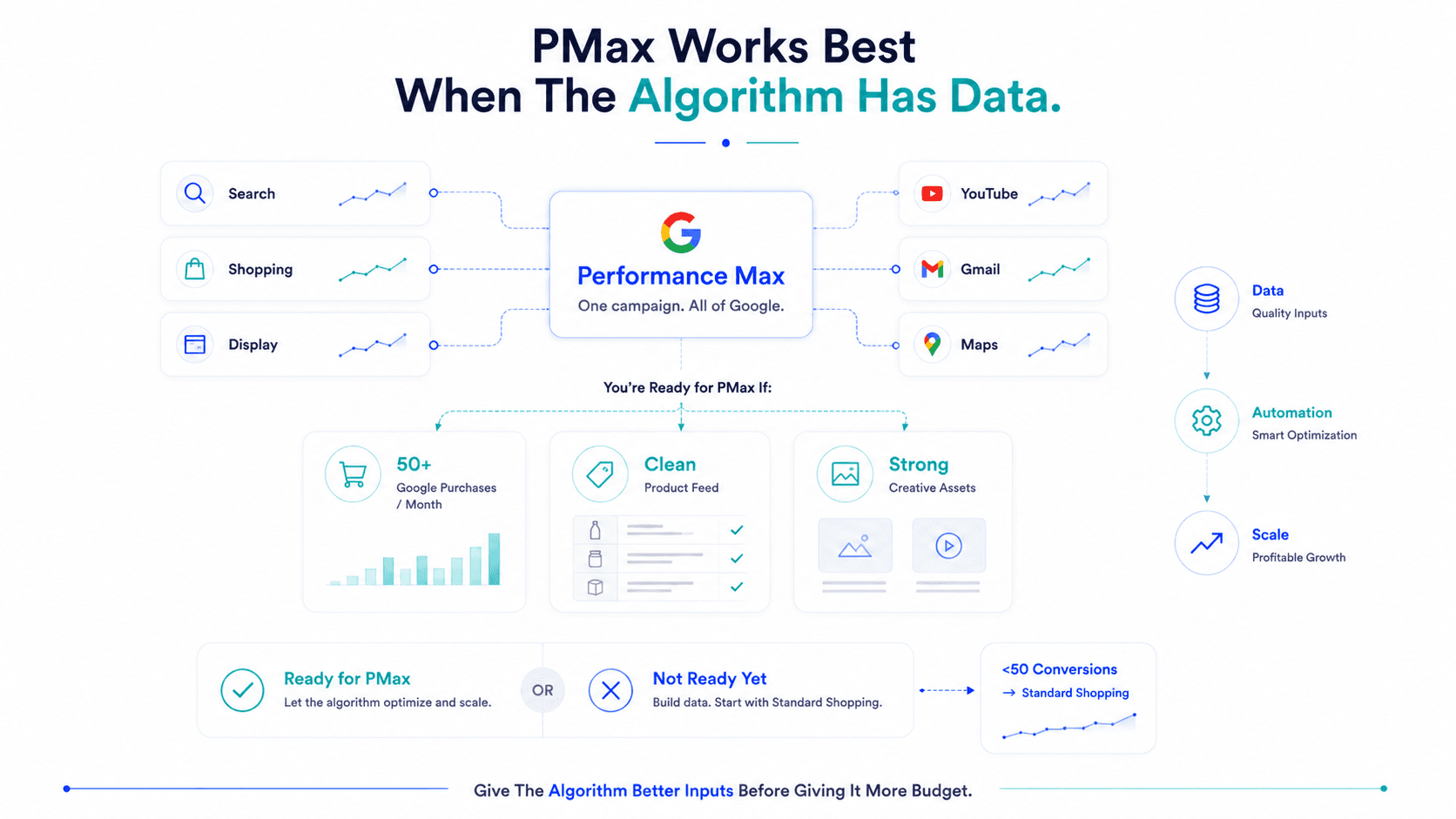
PMax launched as Google's answer to Meta's Advantage+: one campaign type that runs across all of Google's surfaces, Search, Shopping, Display, YouTube, Gmail, with the algorithm handling targeting, bidding, and placement automatically. The promise: more conversions, less management overhead.
The reality: it works extremely well for brands with sufficient conversion data and clean product feeds. It's a budget sink for brands without either.
The algorithm is powerful. But it only optimises for what it can see. Make sure what it can see is pointing toward profit.
PMax replaces a disparate set of campaign types with one AI-driven campaign that serves your ads across:
Google Search
Text ads triggered by relevant queries across high intent
Google Shopping
Product listing ads featured directly in search results
Google Display
Visual banner ads across millions of partner websites
YouTube
Video ads placed before and during engaging content
Gmail
Promotional emails delivered right to the Promotions tab
Google Maps
Local inventory ads where brick-and-mortar applies
The algorithm decides where to serve your ads, who to show them to, and how much to bid, continuously optimising toward your conversion goal.
You supply: a budget, a conversion goal, asset groups (images, videos, headlines, descriptions, your product feed), and audience signals (suggested audiences the algorithm uses as a starting point, not a constraint).
PMax performs best when the algorithm has data to work with. Specifically:
Minimum conversion volume: 50+ purchase events per month attributed to Google
Below this, the algorithm doesn't have enough signal to optimise effectively and tends to defaulting to Display placements, the cheapest clicks, not the most valuable ones.
Clean product feed
For Shopping placements (typically your highest-converting PMax placement), feed quality determines everything. Product titles with specific attributes (brand, product type, key features, size, colour), accurate pricing, and high-quality images are non-negotiable.
Proven creative assets
PMax tests asset combinations to find what performs. If you supply weak images and generic headlines, the algorithm has nothing strong to work with. Bring your best static images, at least one short video (15–30 seconds), and headline variations that include your key differentiators.
Established brand
PMax works better when organic brand search volume exists. If nobody searches for your brand, Search placements within PMax produce little. For early-stage brands with minimal awareness, Standard Shopping is often more efficient.
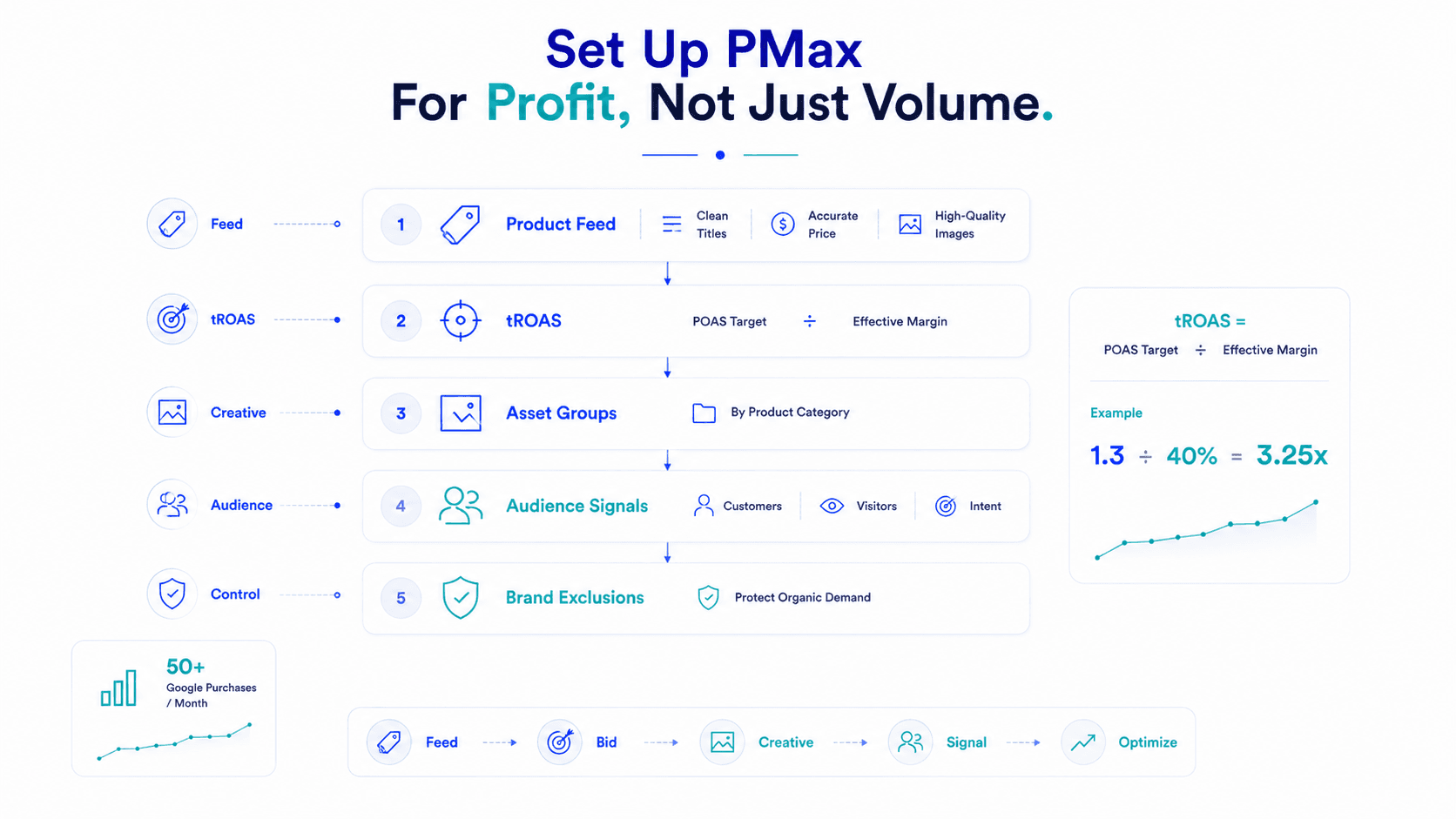
Before creating the campaign, ensure your Merchant Center feed is clean:
⚠️ Poor feed = poor Shopping performance = PMax underdelivering regardless of everything else you do.
For D2C brands: Target ROAS (tROAS) is the right bidding strategy.
tROAS = POAS Target ÷ Effective Margin %
If you're targeting 1.3x POAS with 40% effective margin: tROAS = 1.3 ÷ 0.40 = 3.25x
Starting too high (above 5x for most D2C categories) causes the campaign to underdeliver, the algorithm can't find enough conversions at that efficiency and your spend doesn't pace. Start at a realistic tROAS and tighten as performance stabilises.
Don't create one asset group for your entire catalogue. Create separate asset groups for each major product category, skincare gets its own group with skincare-specific headlines and images, supplements gets another.
Why: the algorithm can then match the right creative to the right search intent. A user searching “vitamin C serum for dark spots” should see your skincare creative, not a generic brand image.
Audience signals in PMax are suggestions, not targeting restrictions. The algorithm will still serve ads outside your signals if it finds conversion opportunity there.
Add as signals:
This gives the algorithm a starting point, it learns from these audiences and expands intelligently from there.
PMax will bid on your own brand terms unless you exclude them. For brands with meaningful organic search volume, this wastes budget capturing conversions that would have happened organically.
Add brand term exclusions via your Google Ads account-level negative keyword list and apply to your PMax campaign.
PMax's reporting is notoriously opaque. You can see total performance (ROAS, conversions, spend) but cannot easily see:
This lack of transparency makes it difficult to diagnose underperformance and easy to run campaigns that look fine on aggregate while Display placements consume budget on low-quality traffic.
Workaround:
Create separate Standard Shopping campaigns running alongside PMax for your hero SKUs. This gives you a controlled comparison, how your shopping listings perform with full visibility versus how PMax's automated approach performs. If Standard Shopping outperforms PMax on POAS, PMax's incremental benefit doesn't justify the opacity.
Like Meta's Advantage+, PMax optimises toward Google-attributed conversions, not toward your real contribution margin.
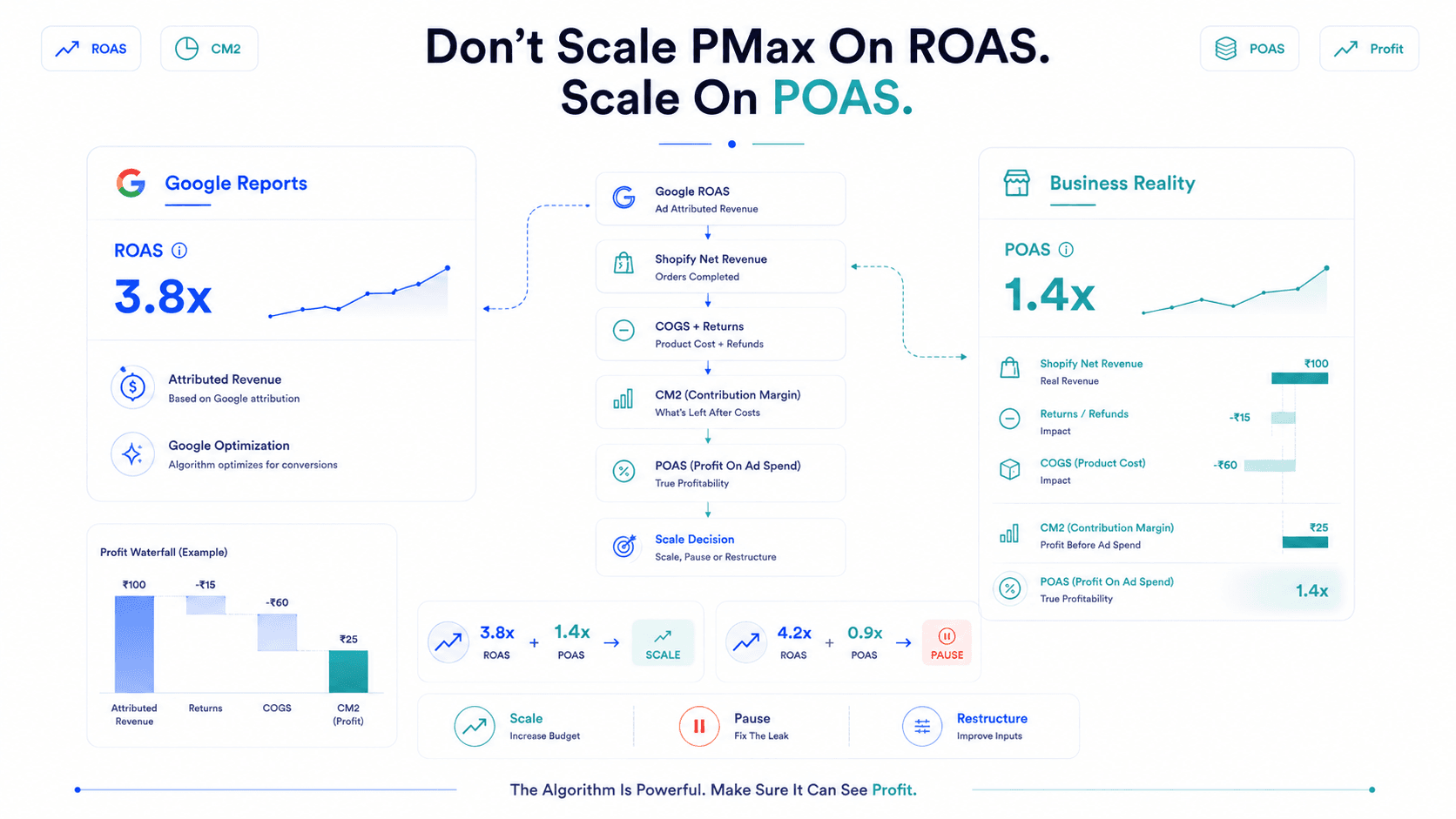
A PMax campaign generating 3.8x ROAS looks strong. But if the products it's scaling have 20% gross margin and a 15% return rate, the POAS is below 1.0. PMax doesn't know this. It keeps scaling.
The fix is external measurement: calculate CM2 and POAS for your PMax campaigns independently, using Shopify net revenue, COGS, and returns data. Use POAS (not ROAS) as your scaling signal.
3.8x ROAS + 1.4x POAS
→ Scale aggressively
4.2x ROAS + 0.9x POAS
→ Pause and restructure
| Situation | Recommended |
|---|---|
| Under 50 conversions/month on Google | Standard Shopping, more control with less data |
| Strong conversion volume + clean feed | PMax — algorithm can optimise effectively |
| Need placement-level transparency | Standard Shopping |
| Scaling established product lines | PMax |
| Testing new products | Standard Shopping first, migrate to PMax once validated |
| Hero SKUs you want to control tightly | Standard Shopping alongside PMax |
The strongest structure for most scaling D2C brands: Standard Shopping for core hero products + PMax for catalogue expansion and cross-surface reach. Let PMax find incremental demand; use Standard Shopping to control bidding on your most important SKUs.
Performance Max is a genuine step forward in Google advertising efficiency, when you have the data to feed it and the measurement infrastructure to know whether it's actually profitable.
Give it a clean feed, realistic tROAS targets, strong creative assets, and audience signals. Run it alongside Standard Shopping for comparison. And measure the outcome on POAS — not on Google's reported ROAS.
The algorithm is powerful. But it only optimises for what it can see. Make sure what it can see is pointing toward profit.
PMax is Google's AI-driven campaign type that runs across Search, Shopping, Display, YouTube, and Gmail from one campaign. It's right for D2C brands with 50+ monthly Google conversions and a clean product feed. Below that threshold, Standard Shopping gives more control and typically better results.
Calculate from your POAS target: tROAS = POAS Target ÷ Effective Margin %. Starting at a realistic level (2.5–4x for most D2C categories) prevents the campaign from underdelivering while it builds conversion data.
Yes. Keep Standard Shopping running for hero SKUs to maintain transparency and a controlled comparison. PMax alongside Standard Shopping gives you broad automated reach plus controlled performance benchmarking.
Flable calculates POAS and CM2 for PMax campaigns using Shopify net revenue, COGS, and returns data, giving you the real profitability picture that Google's campaign reporting can't show.
Connect Google Ads to Shopify and real product margins. Track POAS and CM2 for Performance Max and Standard Shopping without guesswork.